Battery
The CanoFlash dongle runs on a rechargeable battery that charges via USB-C. This guide explains what type of battery you need and how to handle it safely.
Compatible formats
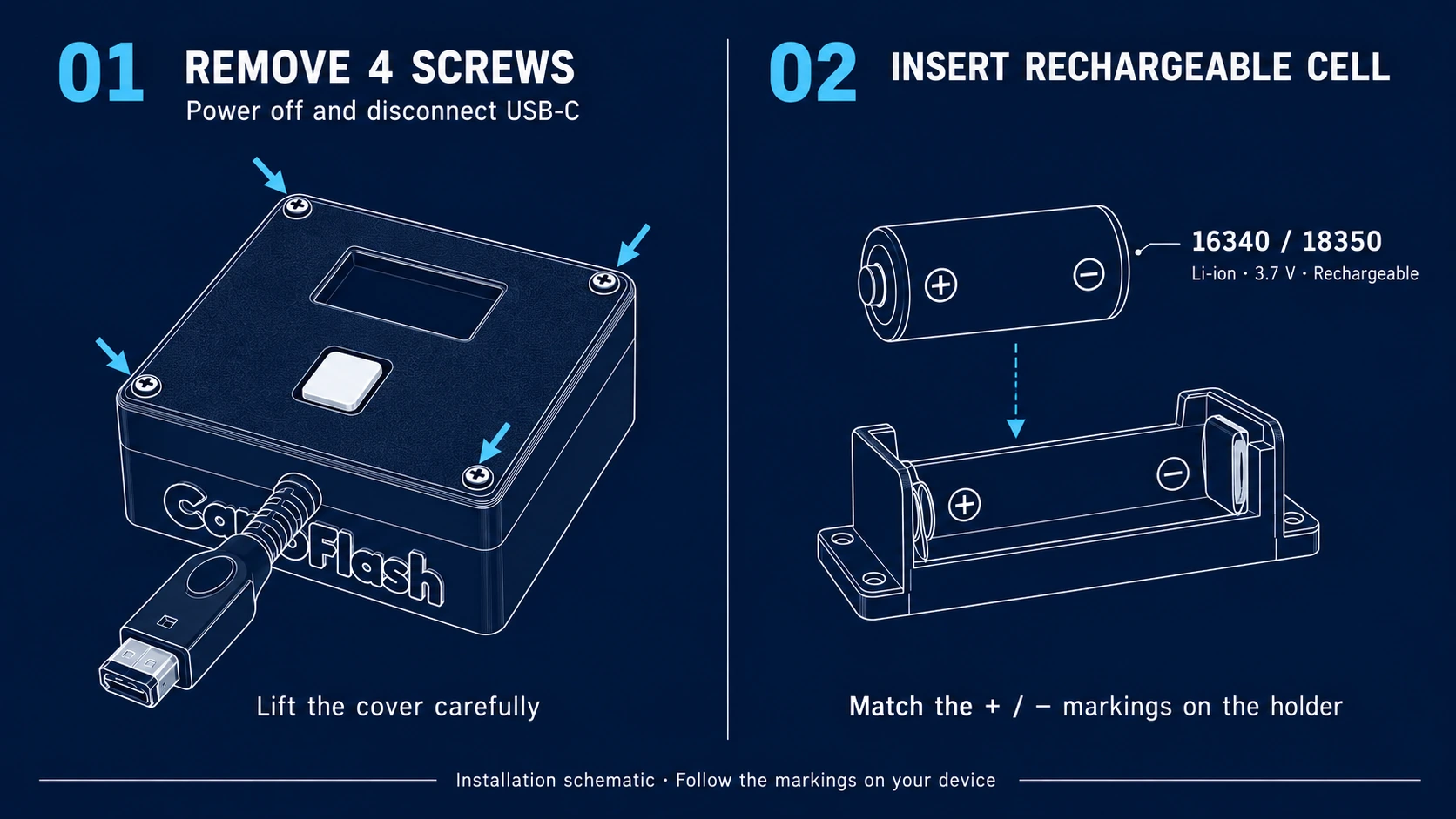
The dongle's battery holder accepts rechargeable Li-ion 3.7V cells in 16340 or 18350 format.
Other common sizes (flat pouch cells, 14500, 18650, etc.) do not fit physically in the holder. If you buy a battery in any other format you won't be able to close the case.
Which cell to buy
Since the dongle charges over USB-C, you need a rechargeable Li-ion 3.7V cell. In hobby stores they're usually labeled as:
- 16340 (3.7V Li-ion) — same physical size as a CR123A. Sometimes sold as RCR123A.
- 18350 (3.7V Li-ion) — a bit longer and thicker than the 16340. Higher capacity and longer runtime.
Both fit the holder. Pick based on preference: 16340 is smaller, 18350 lasts longer.
⚠️ Avoid primary CR123A cells (non-rechargeable, 3V) — they look similar but won't charge over USB and can damage the dongle.
Installation
- Remove the 4 screws from the battery compartment cover (one at each corner).
- Carefully lift off the cover and set it aside.
- Insert the cell respecting the polarity marked on the holder (+ and −).
- Put the cover back in place.
- Screw the 4 screws back in without overtightening (snug against the case is enough).
Never force the cell if it doesn't go in. If it seems stuck, double-check polarity before pushing.
Charging
- Plug a USB-C cable into the dongle. Charging is fully automatic.
- A lightning bolt ⚡ icon appears on the OLED when USB is connected.
- You can keep using the dongle while it charges.
No internal battery: using an external USB power bank
You don't have to install the cell to use the dongle. As long as it gets power through USB-C, it works perfectly. That means you can:
- Run the dongle off a USB power bank in your pocket.
- Plug it into a USB wall charger, a computer, or any standard USB-C power source.
- Travel without the internal battery and just feed it from the same power bank you already use for your phone.
When running without an internal battery, keep in mind the dongle shuts off the moment USB power is interrupted. The internal cell exists to make it standalone and to keep brief power dips from affecting it.
Runtime and battery saving
Wi-Fi stays on in Multiboot, GBA and Online, including while the dongle waits for a connection. Changing mode with the button does not turn the radio off.
Power is saved through automatic shutdown: after 30 seconds without GBA or button activity, the dongle enters deep sleep. An SDK session keeps it awake while the Link continues communicating. After 60 seconds without communication, the session closes and another 30-second idle window begins before shutdown.
A game already written to the cartridge can keep running with the dongle off if it supports offline play. Downloading another ROM, syncing saves and playing online require Wi-Fi.
Runtime depends on actual cell capacity, Wi-Fi signal and usage. We will publish figures after measuring the final hardware with this behaviour.
When to replace the cell
If you notice runtime has dropped sharply or the dongle resets under load, swap the cell for another rechargeable Li-ion 3.7V unit in the same format (16340 or 18350).